
Finding the right software for songwriting or poetry can feel like searching for the perfect instrument. A standard word processor gets the words down, but it doesn't understand the rhythm, sound, and structure that turn simple text into a moving lyric or a resonant poem. When you're ready to move beyond a blank page and work with tools designed for your craft, knowing what to look for is essential.
This guide walks you through the key features of modern songwriting and poetry software. We'll explore what makes these tools different and provide a practical framework to help you compare your options and choose the best environment for your writing process.
The Writing Environment: More Than Just a Text Editor
The foundation of any writing software is its editor. For lyricists and poets, a generic text editor often falls short. Your creative process needs a space that understands the structure of verse, not just paragraphs. When evaluating software, look for a clean, focused writing environment that supports the unique format of your work.
A Focus on Structure
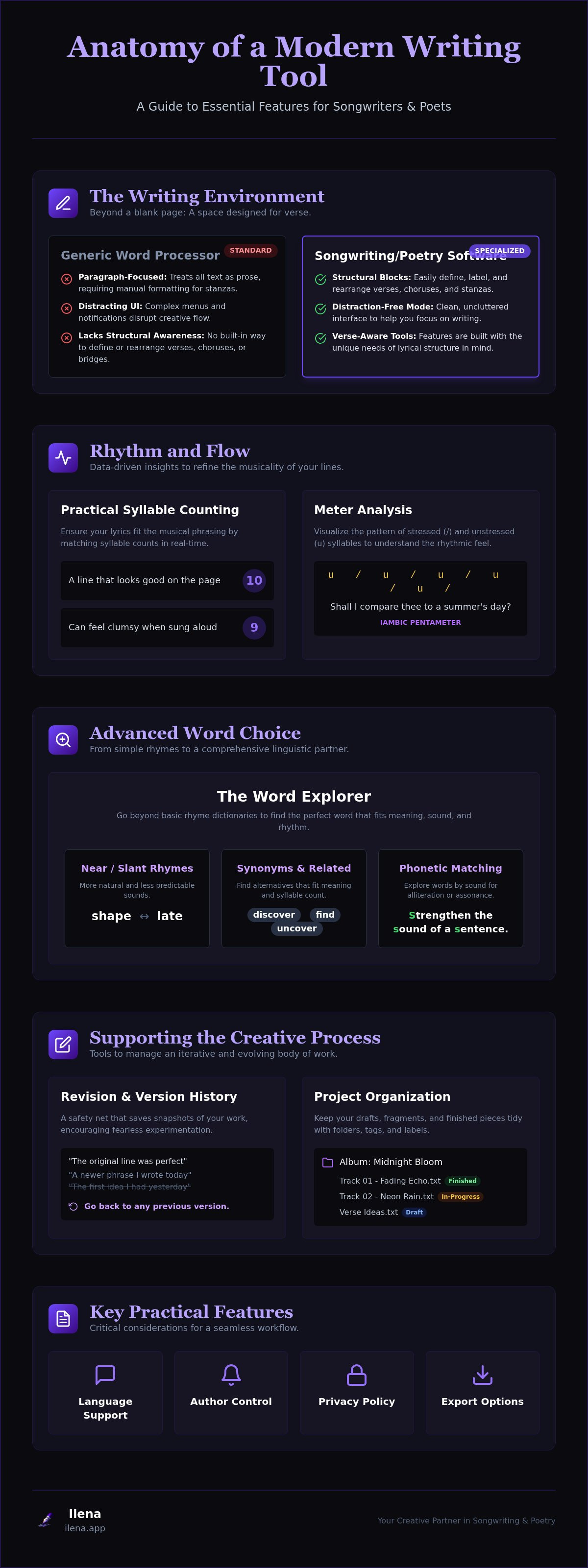
Songs and poems are built in sections: verses, choruses, bridges, and stanzas. While you can manually format these in any document, specialized software often includes features to define and organize these blocks. This can make it easier to rearrange sections, experiment with different structures, and maintain a clear overview of your entire piece. A good editor allows you to focus on the words without getting bogged down in manual formatting.
A Distraction-Free Workspace
Deep creative work requires focus. Many modern applications are filled with notifications, complex menus, and distracting visual elements. The best songwriting software prioritizes a clean, uncluttered interface. The goal is to provide powerful tools that remain out of the way until you need them, allowing you to immerse yourself in the writing process without interruption.
Rhythm and Flow: Syllable and Meter Tools
Rhythm is the heartbeat of a song or poem. A line that looks good on the page can feel clumsy or awkward when sung or read aloud. This is where specialized tools for analyzing rhythm become invaluable. They provide data-driven insights into the flow of your language, helping you refine your lines with precision.
Practical Syllable Counting
A syllable counter is one of the most fundamental tools for a lyricist. When writing lyrics for a melody, the number of syllables in a line must match the musical phrasing. A mismatch can result in words feeling rushed or stretched unnaturally.
For example, consider a line in a chorus that needs to be repeated over a slightly different melodic phrase. A real-time syllable counter helps you instantly see if your new line has the same count as the original, ensuring a consistent and singable fit. This simple feature saves countless hours of manual counting and guesswork.
Understanding Meter
Meter refers to the pattern of stressed and unstressed syllables in a line, which creates its rhythmic feel. While you don't need a deep knowledge of poetic theory to write great lyrics, understanding the basics of meter can help you identify why a line feels "off."
Some advanced writing tools offer meter analysis, which visualizes these stress patterns. This isn't about forcing your work into a rigid structure like iambic pentameter; it's about gaining awareness. By seeing the rhythmic pulse of your lines, you can make more intentional choices, smooth out awkward phrasing, and ensure your words carry the emotional weight you intend.
Word Choice: Advanced Rhyme and Vocabulary Tools
Finding the perfect word is a core challenge for any writer. While online rhyme dictionaries are a common starting point, dedicated songwriting and poetry software offers far more sophisticated tools for word exploration. These features go beyond simple rhymes to help you discover words that fit the meaning, sound, and rhythm of your piece.
From Rhyme Dictionary to Word Explorer
A basic rhyme dictionary gives you a list of words that rhyme perfectly. A more advanced "word explorer" tool functions as a comprehensive linguistic partner. It can help you find:
- Near Rhymes (or Slant Rhymes): Words that share similar vowel or consonant sounds but don't rhyme perfectly (e.g., "shape" and "late"). These often sound more natural and less predictable in modern lyrics.
- Synonyms and Related Words: Discover alternative words that carry the right meaning and fit your syllable count.
- Phonetic Information: Explore words based on their sound, helping you find alliteration or assonance to strengthen the musicality of a line.
Instead of just finding a word that rhymes, these tools help you find the right word—one that enhances the line's meaning and sound simultaneously.
The Creative Process: Version History and Organization
Writing is an iterative process. The first draft is rarely the final one, and brilliant ideas can get lost during rewrites. Effective software should support this journey by helping you track your progress and organize your body of work.
Protecting Your Revisions with Version History
Have you ever rewritten a verse only to realize an hour later that the original line was better? Without a good system, that original idea might be gone for good. Version history, or versioning, is a feature that saves snapshots of your work over time. It acts as a safety net, allowing you to look back at earlier drafts and recover lines or ideas you might have discarded. This encourages fearless experimentation, as you know you can always return to a previous state of your work.
Project Organization for Writers
As you write more, your collection of drafts, fragments, and finished pieces can become overwhelming. Look for software that offers robust organizational tools. This might include using folders, tags, or labels to categorize your work by project, theme, status (e.g., "in-progress," "finished"), or any other system that works for you. A well-organized library makes it easy to find what you're looking for and see connections between different pieces of your work.
Essential Practicalities to Consider
Beyond the core creative tools, several practical features determine whether a piece of software will fit into your workflow. These include language support, author control, privacy policies, and your ability to export your work.
- Multilingual Support: If you write in more than one language, verify that the software's linguistic tools (rhyme, syllable counting, etc.) support all the languages you use. Many tools are designed only for English, which is a major limitation for bilingual or multilingual writers.
- Author Control and Privacy: In an age of AI, it's crucial to understand how a tool uses your data. Does the company claim any ownership of the content you create on its platform? An author-first platform will have a clear privacy policy stating that you retain full ownership of your work. Be clear on the difference between tools that assist your writing (by providing data like syllable counts) and those that generate content, which may have different implications for copyright and creative ownership.
- Export Options: Your work shouldn't be trapped in a single application. Check for flexible export options. You should be able to easily save your work in common formats like .txt, .pdf, or .docx for sharing, printing, or archiving.
A Comparison Checklist for Songwriting and Poetry Software
As you evaluate different options, use this checklist to compare their features. Not every writer needs every tool, but this list covers the key areas that separate specialized software from general-purpose apps.
Writing & Editing
- Does the editor offer a clean, distraction-free interface?
- Can you easily structure your work into sections (verses, choruses, stanzas)?
Rhythm & Meter
- Does it include a real-time syllable counter?
- Does it offer any form of meter or stress pattern analysis?
Vocabulary & Rhyme
- Does it provide a rhyme dictionary?
- Does it include tools for near rhymes, synonyms, and related words?
Workflow & Organization
- Is there a version history feature to track revisions?
- Does it offer tools for organizing projects (e.g., folders, tags)?
Practical Features
- Does it support all the languages you write in?
- Is the privacy policy clear that you own your work?
- Can you easily export your work in standard formats?
An Author-First Approach: Introducing Ilena
For writers looking for a toolset built around the principles of craft and authorial control, Ilena is a platform designed to serve as a focused writing environment. It's built on the philosophy that software should assist, not automate, the creative process.
Ilena integrates many of the essential features discussed in this guide into a single, cohesive workspace. Its language engine is built to provide deep linguistic insights, including precise syllable counting and meter analysis tools to help you refine the rhythm of your lines. The integrated word explorer goes beyond basic rhymes, offering a rich vocabulary of synonyms and related words to help you find the perfect expression.
One of its core strengths is its multilingual capability, with full support for English, French, and Spanish. This makes it a valuable tool for writers working across these languages. It also includes dedicated version management and project organization features to support your entire creative workflow.
Importantly, Ilena is an author-first environment. While its language engine may offer optional suggestions to help you overcome creative blocks, it does not use generative AI to write for you. The focus remains on empowering you with data and tools to enhance your own unique voice. If you're looking for a professional toolset dedicated to the craft of writing, Ilena is a compelling option to consider.
Start refining your lyrics with Ilena’s precision tools
Frequently Asked Questions
Can I use poetry software for writing song lyrics?
Absolutely. The core needs of poets and lyricists are very similar. Both benefit from tools that analyze rhythm, rhyme, and word choice. Most dedicated songwriting and poetry software is designed for both disciplines, as the underlying principles of verse are universal.
What's the difference between an AI lyric generator and a writing assistant tool?
An AI lyric generator creates new text, often based on a prompt, with the goal of writing lyrics for you. A writing assistant tool, on the other hand, provides you with data and suggestions about the words you have already written. It helps you analyze syllable counts, find rhymes, or explore synonyms, but you remain in full control of the creative process.
How do these tools help with rhythm beyond just counting syllables?
Beyond a simple count, some advanced tools provide meter analysis, which visualizes the stressed and unstressed syllables in your lines. This helps you identify the natural rhythm of your words, spot awkward phrasing, and ensure the lyrical flow matches your intended cadence or melody, giving you a deeper level of control over the musicality of your language.
Do I need special software if I'm just starting out?
While you can certainly start with a simple notebook or word processor, specialized software can be a great learning tool. By providing immediate feedback on things like syllable counts and rhyme schemes, these platforms can help you develop a stronger intuitive sense of rhythm and structure more quickly. Many offer free trials, allowing you to see if the tools fit your process before committing.